+91 95752 60218

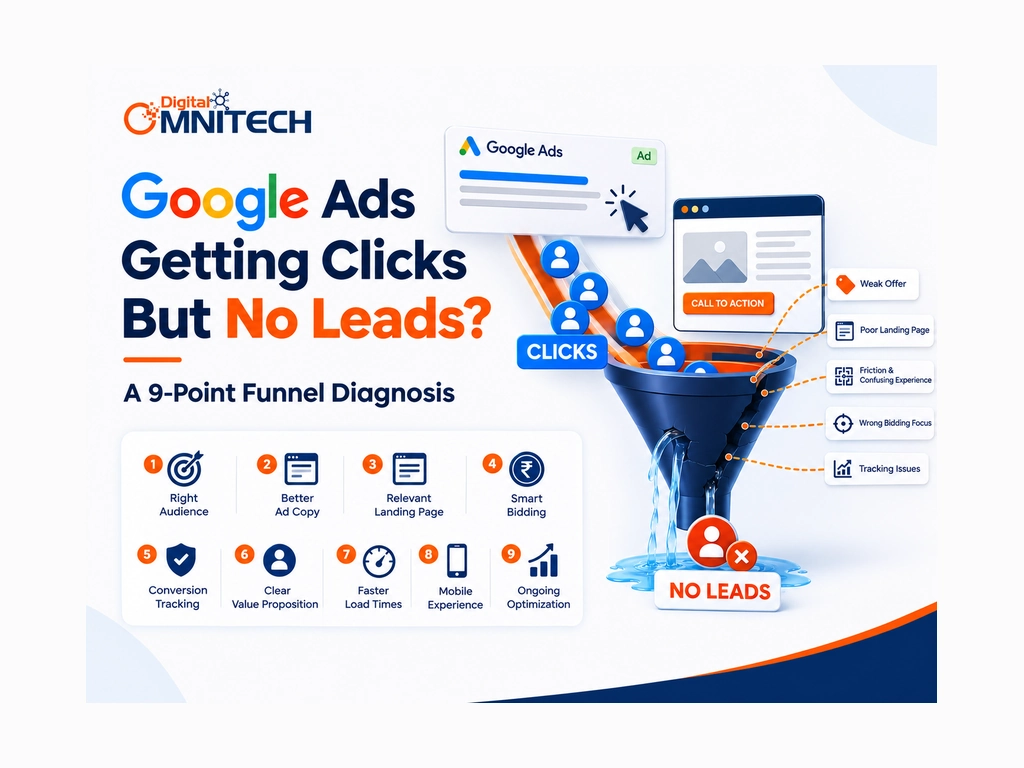
Your Google Ads campaign is getting clicks, but your phone is not ringing and inquiry forms remain empty. The problem may lie beyond your ads, including tracking errors, irrelevant searches, or a landing page that fails to convert. This nine-point checklist helps you identify the bottleneck before spending more.
Key Takeaways
- Conversion tracking must work correctly before you judge campaign performance.
- Search terms reveal irrelevant queries that can waste advertising spend.
- Landing pages need relevant information, trust signals, and clear calls to action.
- Mobile usability and form simplicity influence the inquiry experience.
- Qualified lead rate matters alongside conversion rate and cost per lead.
- Local targeting should match your actual services and service areas.
- Systematic testing helps prioritize fixes before increasing your budget.
What Does It Mean When Google Ads Are Not Generating Leads?
Google Ads campaigns that receive clicks but generate no leads may have problems with conversion tracking, search intent, landing-page experience, or the offer itself.
A click means someone visited your website through an ad. A conversion is a tracked action, such as submitting a form or calling your business. A qualified lead is a genuine prospect who fits your business requirements.
For example, a campaign might record 100 clicks but no inquiries because its contact form is broken, its visitors have the wrong intent, or conversion tracking is misconfigured.
Why Is It Important to Diagnose Google Ads Lead Generation Problems?
Diagnosing lead generation problems lets you spot where money is wasted and helps you decide using results instead of just clicks. I have seen that this approach gives insight than relying on click numbers alone.
Monitor these metrics:
- Conversion rate: The percentage of ad clicks that turn into conversions.
- Cost, per lead: The amount of money spent on advertising divided by the number of leads.
- Qualified-lead rate: The percentage of leads that meet the sales criteria you set.
- Lead-to-customer rate: The percentage of leads that turn into paying customers.
For example a campaign that brings in leads may still perform poorly if most of the inquiries are not useful or cannot be reached.
Why Are My Google Ads Getting Clicks but No Conversions?
Use this nine-point checklist to identify the likely problem. Start with tracking then examine traffic quality, the landing page and the sales process.
1. Check Google Ads Conversion Tracking
Warning sign: Your campaign receives clicks.. Google Ads reports zero conversions.
How to check: Submit a test form test the phone-call journey and inspect your conversion actions and Google tag diagnostics.
What to fix: Correct tags, broken event triggers duplicate events or incorrectly configured conversion actions. Confirm that the intended conversion records, before changing your campaign.
2. Review Search Terms and Keyword Intent
Warning sign: Your ads attract visitors looking for information rather than your service.
How to check: Review the Google Ads Search Terms Report to see which actual queries triggered your ads.
What to fix: Add relevant negative keywords, refine keyword match types where appropriate, and align targeting with commercial intent.
3. Improve Ad Relevance and Messaging
Warning sign: People click your ad but discover that the offer does not match their expectations.
How to check: Compare the search query, ad copy, pricing expectations, service details, and landing-page content.
What to fix: Make your offer specific and accurate. Clearly communicate your service, location, and next step without making unsupported promises.
4. Audit Your Landing Page
Warning sign: Visitors arrive but leave without contacting you.
How to check: Confirm that the page answers the searcher’s question, explains the offer, displays trust signals, and makes the next step obvious.
What to fix: Use a clear headline, relevant service details, genuine testimonials where available, and a visible call to action. Consider a dedicated landing page for each major service.
5. Reduce Form and Contact Friction
Warning sign: Visitors show interest but abandon the inquiry process.
How to check: Test every form, phone link, CTA button, and contact method.
What to fix: Remove unnecessary form fields, fix broken links, explain what happens after submission, and make contact options easy to find.
6. Test Mobile Experience and Page Speed
Warning sign: Your landing page works on a desktop but is difficult to use on a phone.
How to check: Open the page on a mobile device and test its loading performance using PageSpeed Insights.
What to fix: Improve mobile layouts, resize oversized images, resolve usability problems, and make forms easy to complete.
7. Review Location and Audience Targeting
Warning sign: Your ads pull in requests from people who’re not in the service area you serve or the target market you aim for.
How to check: Look over settings location reports, audience settings and any exclusions that apply.
What to fix: Match the targeting, to the locations you serve and the customers you want. For instance a local plumber should focus on searches that match the service area not on locations.
8. Evaluate Budget and Bidding Strategy
Warning sign: Your campaign uses its budget. Does not generate enough useful conversions.
How to check: Examine campaign objectives, budget limits, bidding strategy, conversion volume and recent performance.
What to fix: Make sure the bidding strategy has conversion data and a suitable objective. Do not change bids or budgets without finding the root problem.
9. Investigate Lead Quality and Follow-Up
Warning sign: Leads show up in reports yet only a few become sales chances.
How to check: Review lead records see what calls result in look at spam entries check if people can be reached and note how fast they reply. Compare ad data with your CRM or sales records if you have them.
What to fix: Make lead qualification better cut out traffic that does not matter and reply quickly. Aim for business results instead of counting every small interaction as a successful lead.
What Tools Help Troubleshoot Google Ads Lead Generation?
Google Ads, Google Analytics 4, Google Tag Manager, PageSpeed Insights, and CRM data help identify problems at different stages of the conversion funnel.
| Tool | What to investigate |
| Google Ads Search Terms Report | Irrelevant searches and keyword intent |
| Google Ads conversion diagnostics | Conversion setup and recording issues |
| Google Analytics 4 (GA4) | Landing-page engagement and conversion journeys |
| Google Tag Manager | Tags, triggers, and event implementation |
| PageSpeed Insights | Loading performance and mobile issues |
| CRM or lead-management system | Lead quality and sales outcomes |
Example: If your campaign receives 500 clicks but records no conversions, verify tracking and test the form before assuming your keywords are responsible. The click count alone does not establish whether the campaign is performing well or poorly.
How Can You Fix Google Ads Spending Money but Not Getting Enquiries?
- You can solve Google Ads lead generation problems by fixing real technical problems then making traffic more relevant and by testing the landing page before you make big changes to the campaign.
- Follow this action plan:
- Verify tracking: Make sure that real inquiries are recorded correctly.
- Review search terms: Spot search queries that’re not relevant or that show low intent.
- Test the landing page: Look at forms call‑to‑action buttons, mobile friendliness and how fast the page loads.
- Check lead quality: See if inquiries match your customer.
- Test one change at a time: Compare results over a period.
- Monitor outcomes: Track the conversion rate, cost, per lead and the rate of leads.
For local businesses, align keywords, ads, landing pages, and geographic targeting with the services actually offered. Businesses that also need organic visibility can explore SEO services for sustainable search visibility alongside paid advertising.
What Should You Do Next to Improve Google Ads Lead Generation?
First look at the thirty days of campaign data and stretch that period if conversion volume is low or if business conditions change. Sort problems by the impact they have by how confident we are in our diagnosis and by the amount of effort needed. Check tracking before we judge the results and do not rebuild the campaign if we do not have evidence.
If the cause stays unclear a structured account review can help us spot opportunities, for improvement.
Conclusion: How Can You Turn Google Ads Clicks Into Meaningful Leads?
Google Ads clicks without leads are a symptom, not a diagnosis. Tracking errors, irrelevant searches, landing‑page friction and poor lead qualification can all be reasons for the problem.
Start with the checklist, fix the most likely bottleneck and measure genuine business outcomes before increasing your budget. Consistent testing helps you make informed decisions about campaign performance.
FAQs: Google Ads Not Generating Leads
1. Why are my Google Ads getting clicks but no leads?
Google Ads may get clicks without generating leads because of tracking errors, irrelevant search terms, weak ad messaging, landing-page problems, or a confusing inquiry process. Check conversion tracking first, then review traffic quality and the landing page.
2. How do I fix Google Ads getting clicks but no conversions?
Verify conversion tracking, review the Search Terms Report, improve ad relevance, test landing-page forms, and check mobile usability. Fix confirmed issues before changing bids or increasing your budget.
3. How can I check whether Google Ads conversion tracking is working?
Submit a test form or complete another intended conversion action, then check your Google Ads conversion diagnostics and tag implementation. Confirm that the action records correctly and investigate missing or duplicate events.
4. How can I reduce wasted ad spend in Google Ads?
Review actual search queries, add relevant negative keywords, refine targeting, and remove unnecessary landing-page friction. Monitor cost per lead and qualified-lead rate to understand whether your spending generates valuable inquiries.
5. Why are my Google Ads generating leads that do not convert into customers?
Poor-quality leads may result from broad search intent, unsuitable targeting, unclear offers, or slow sales follow-up. Review lead records and sales outcomes to identify which campaigns generate genuine business opportunities.